Can Not Display AR
Allowing Web-Camera Access on HTTP Sites
Cannot Access Webcam
We can't access your webcam at the moment.
This can be because you simply don't have one, or it can be caused by the security settings on your browser.
If you have a webcam and there is no secure version of this page, please follow the guide below...
Adjust Security in Chromium Browsers
In your browser, visit chrome://flags/#unsafely-treat-insecure-origin-as-secure (you will need to copy this and paste it into your browsers address bar).
Enter http://, plus the name of your ARDI server, in the text-box provided. See below for an example.
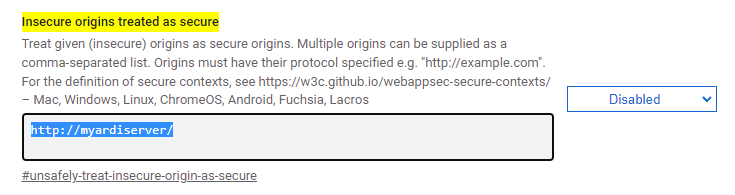
Change the setting from Disabled to Enabled.
Press the 'reload' button at the bottom of the screen, or completely restart your browser (ensuring every window is closed)
If you can get access to your webcam but are getting certificate warnings, you might need to install the Optrix Root Certificate.